
Discover the metrics of Fractional Volume Mixed and Uniformity Index that can be used to calculate mixing time for tracer mixing in a continuously stirred mixer.
Challenges
Mixing non-Newtonian liquids in a stirred vessel is challenging because their viscosity changes with shear rate, making flow patterns difficult to predict. Shear-thinning fluids may form stagnant zones where viscosity remains high, while shear-thickening fluids can overload the mixer and reduce effective circulation. Non-Newtonian behavior also weakens turbulence, slowing blending and limiting radial and axial flow. Achieving complete mixing in short times requires careful impeller selection, sufficient shear generation, and optimized placement to avoid dead zones. Additionally, scale-up is difficult because power consumption and flow characteristics do not follow Newtonian correlations, making uniform mixing at industrial scale even more complex.
Engineering Solutions
Typical engineering solutions for addressing the challenges of mixing non-Newtonian liquids focus on improving flow, minimizing dead zones, and ensuring adequate shear distribution. Engineers often select impellers that generate strong axial flow—such as pitched-blade turbines or helical ribbon mixers—to promote top-to-bottom circulation in highly viscous or shear-thinning fluids. Baffling is adjusted to prevent vortex formation and increase macro-mixing efficiency. Variable-speed drives allow operators to tune shear rates to match the fluid’s rheology without causing excessive energy consumption or shear degradation. In some cases, dual-impeller configurations or anchor-ribbon combinations are used to balance bulk flow with localized shear. Vessel geometry, such as aspect ratio and bottom shape, is also optimized to reduce stagnant regions and enhance overall uniformity.ANSYS Fluent provides a powerful framework for evaluating these design strategies by simulating complex non-Newtonian rheology and predicting resulting flow fields. Engineers can model different impeller types, speeds, and vessel geometries to visualize circulation loops, shear distributions, and potential dead zones. Using the fractional volume mixed method, Fluent tracks species or tracer dispersion over time, allowing quantitative assessment of how quickly and completely the mixing process progresses. The uniformity index further evaluates the homogeneity of the mixture by comparing concentration deviations across the domain, providing a clear metric for mixing quality. By iterating simulations across various configurations, Fluent helps identify the most effective setups for achieving rapid and complete mixing before physical prototyping.
Method
Setting up a mixing simulation involves several steps. These steps include geometry preparation, meshing in Fluent Meshing Mode, steady-state flow with turbulence calculations, and transient species transport calculations.
Uniformity Index
One method of assessing mixing time is to use Uniformity Index. The uniformity index is a metric that quantifies how well mixed the two liquids are. It is a scalar measure of how homogeneous the entire vessel is. It typically describes how close the mixture’s tracer concentration field is to being uniform everywhere. The equation used in Fluent is given as follows.
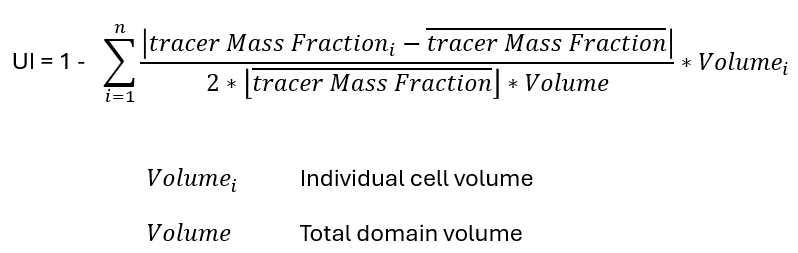
where:
UI = 0: completely unmixed (initial state)UI = 1: perfectly uniform mixture
UI = 0.95 or UI = 0.99: often used to define “mixing time”
Fractional Volume Mixed
Another method of assessing mixing time is to use Fractional Volume Mixed (or unmixed). Fractional volume mixed describes the portion of the vessel’s liquid volume that has reached a defined level of mixing quality. It answers the question: “What fraction of the tank is adequately mixed?” The equation for this fraction is given as follows.

where:
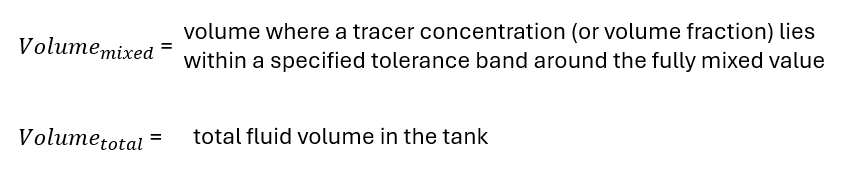
A region is considered “mixed” if:

where: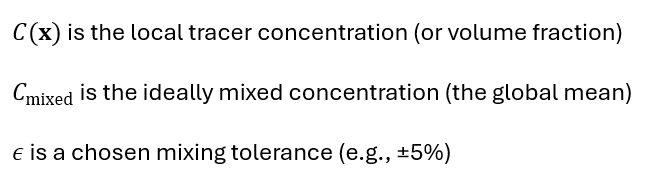
The tolerance is used to calculate lower and upper limits on the tracer concentration about the value of 1.0. For example, a 5% tolerance would result in a lower limit of 0.975 times the ideally mixed concentration, and it would result in an upper limit of 1.025 times the ideally mixed limit. CFD volume mesh elements can be assigned a binary number of 0 or 1 depending on if a mesh element is considered "mixed." The sum of the "mixed" mesh elements is used in the calculation of the Volume_mixed equation above.
Geometry Preparation
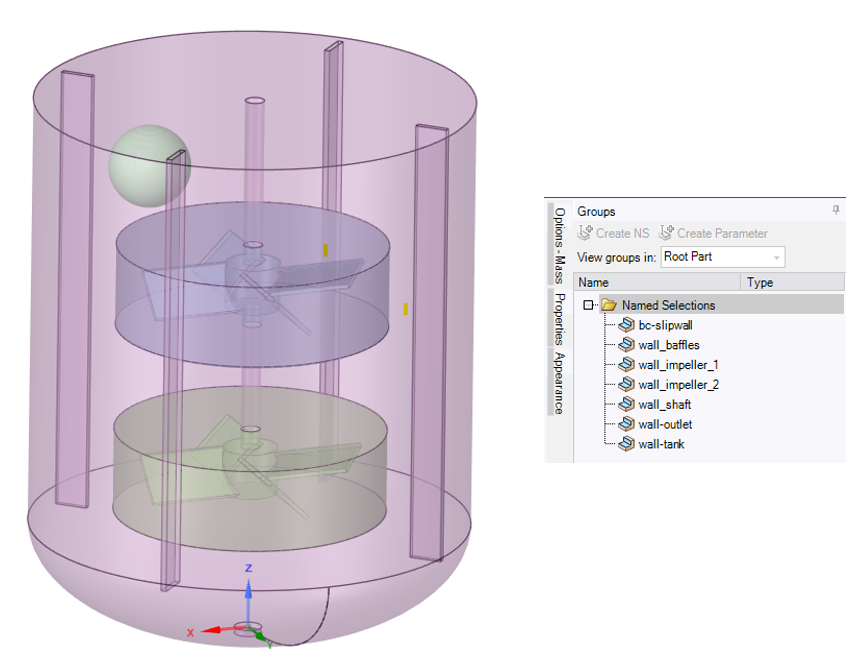
This blog uses an example mixing vessel. The vessel contains two impellers and four baffles. The total liquid volume in the vessel is about 460 Liters. The tracer liquid to be mixed has a volume of 1.77 Liters. The tracer is assumed to be added just below the top surface and in the volume of a sphere. Only fluid-type regions are needed for the Fluent simulation; therefore, the solid bodies are suppressed for physics after being used to generate the fluid volumes. There four fluid volumes: one for the tank, one for each impeller zone, and one for the tracer release zone. The tracer zone geometry is not necessary if one wishes to release tracer from a cell register zone. Topology should be shared between the fluid zones before reading the geometry into the Fluent Mesh Mode. Named Selections are recommended for setting boundary conditions and for post-processing. Below is an image of the mixer with the tracer release zone near the top, and beside it is an example list of named selections for the different walls in the mixer.
Meshing in Fluent Meshing Mode
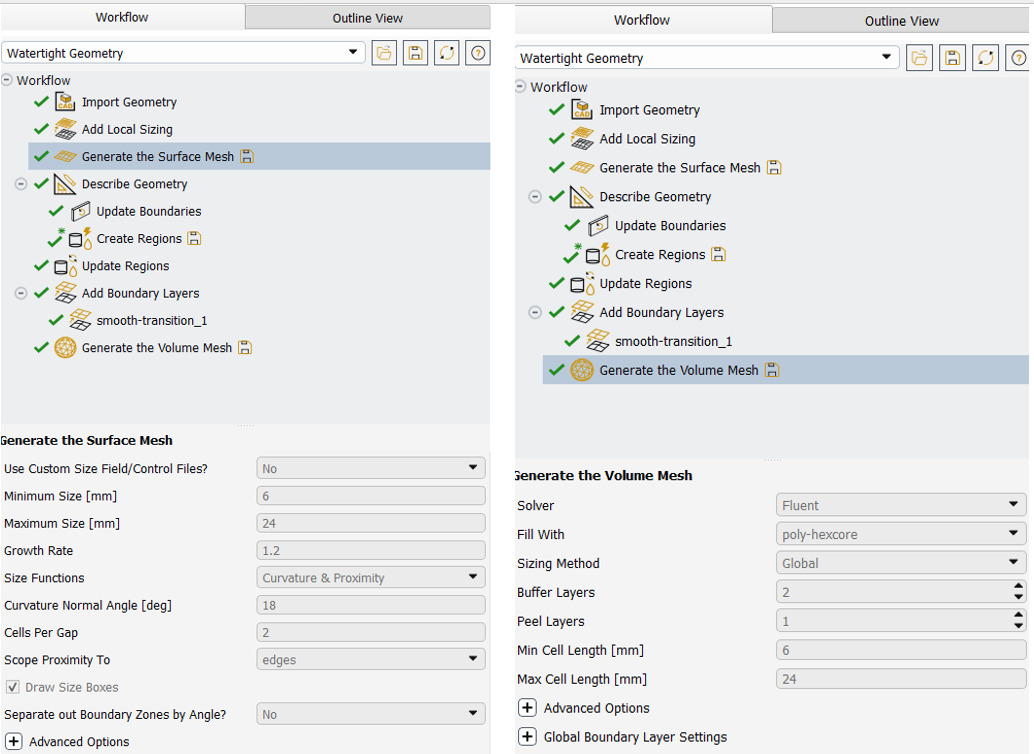
Meshing the geometry for flow solution is done using the Fluent Meshing Mode. The Watertight workflow is used. A surface mesh is generated with a minimum size of 6 mm and a maximum size of 24 mm. The geometry consists of only fluid regions. All fluid-fluid boundary types are set to be changed from "wall" to "internal." Three boundary layers are added to the walls while using the smooth-transition Offset Method Type. A poly-hexcore mesh is generated using 2 buffer layers, 1 peel layer, a min cell length of 6 mm, and a max cell length of 24 mm.
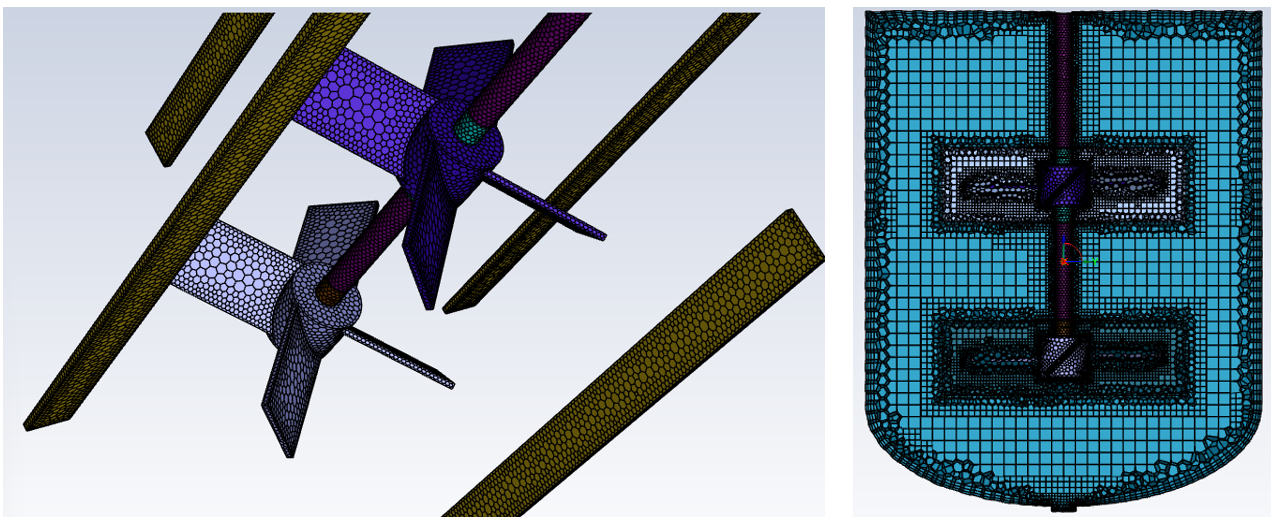
The resulting mesh is shown below. The mesh has 377344 volume elements, a minimum orthogonal quality of 0.22, and a maximum aspect ratio of 29. The mesh distribution is displayed below
Steady-State Flow with Turbulence Calculations in Fluent
The overall simulation is performed in two phases:
- Steady-state calculations of flow and turbulence
- Transient calculations of species transport
Steady-state calculations use the pressure-based solver with the SST k-omega turbulence model and species transport model. Energy, multiphase, and Discrete Phase models are left deactivated.
A mixture of tomato sauce and carrot puree are used for the mixture species liquids. Tomato sauce is the majority species; therefore, it is listed last in the list of mixture species. Both fluids are assumed to behave with non-Newtonian behavior. Activating the non-Newtonian viscosity models requires the use of the following Text User Interface command followed by "y" for yes.
/define/models/viscous/turbulence-expert/turb-non-newtonian?
Images of this command along with the definition of the density and viscosity of the two liquids are shown below. In this example both fluids are modeled with the same non-newtonian-power-law consistency index and power-law index values.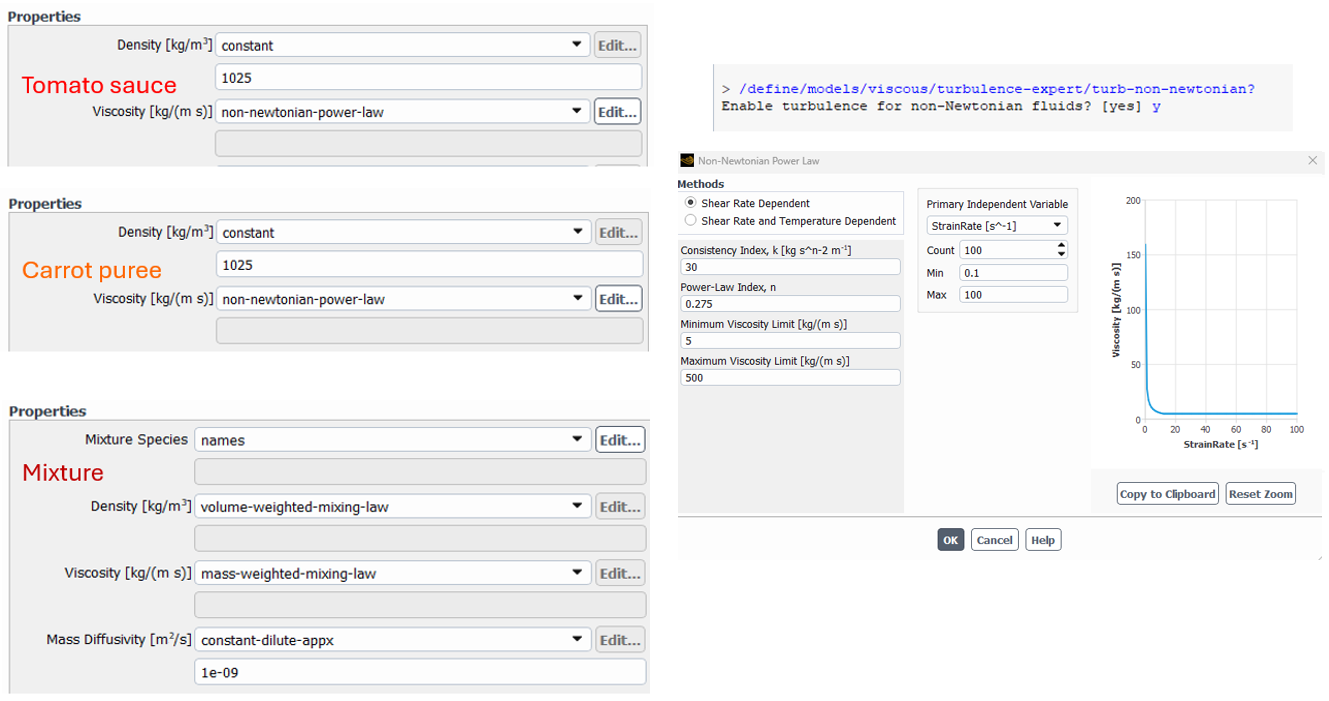
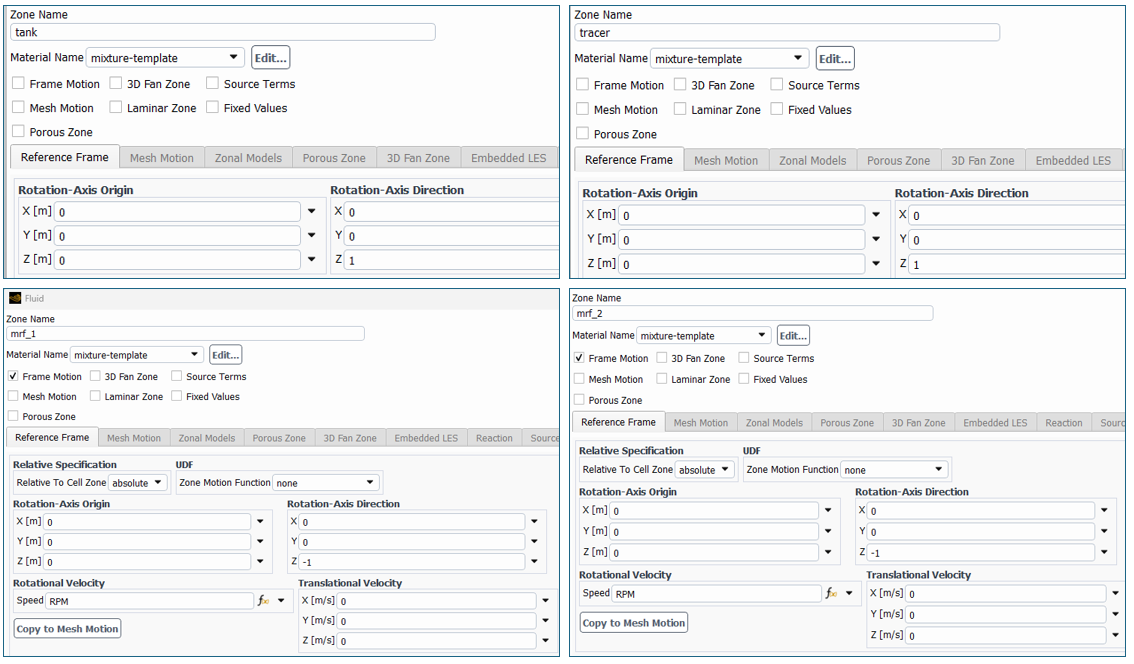
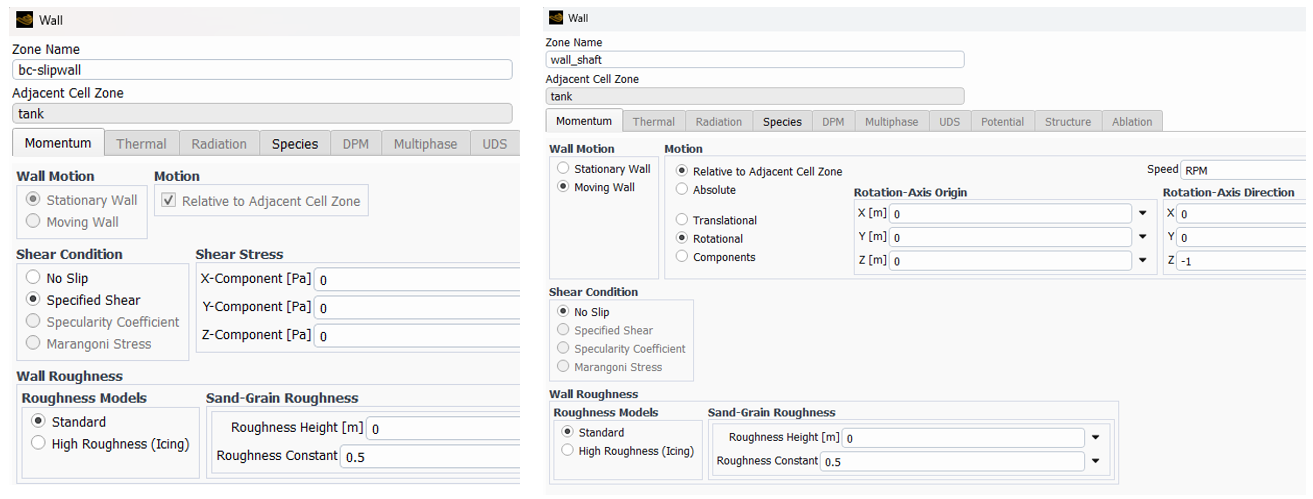
The cell zones all use the same material "mixture-template." The rotating impeller zones use Frame Motion with rotation in the negative Z direction at a rotational velocity given by the named expression "RPM."
The top surface of the tank is modeled with a zero-shear wall. The shaft walls that are not adjacent to frame motion fluid cells are modeled with rotational velocity.
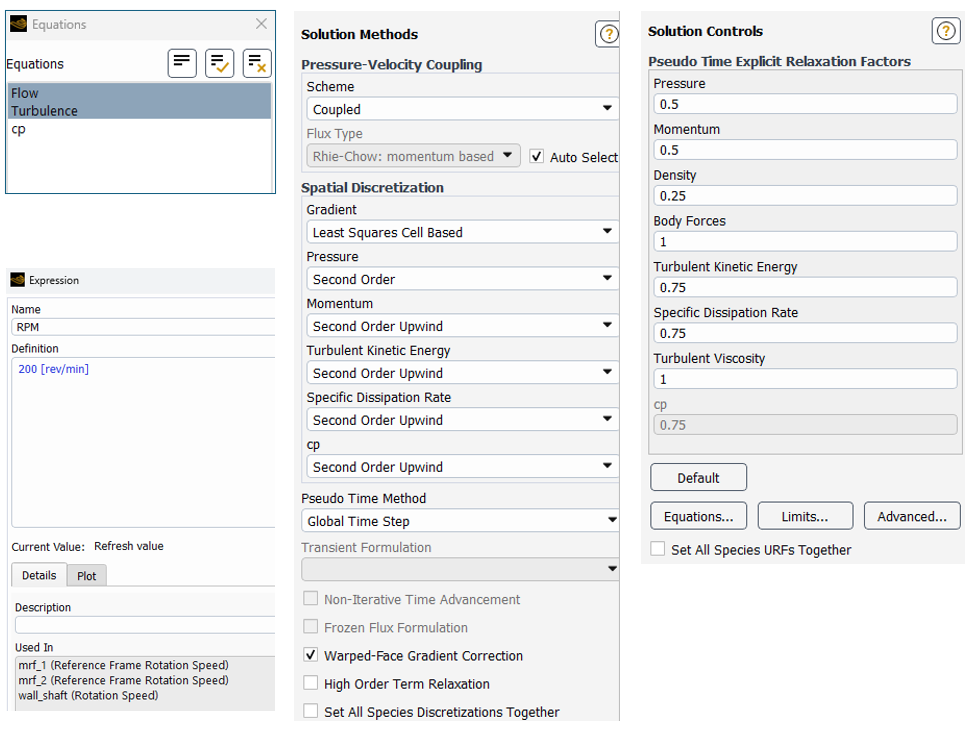
Solver settings for steady-state calculations include only the flow and turbulence equations along with the default methods and controls. Calculations are performed until steady-state velocity, pressure, and turbulence is obtained.
Transient Species Transport Calculations in Fluent
In the transient phase, the flow and turbulence equations are deactivated, thereby freezing the velocity, pressure, and turbulence distributions. The species equation "cp" is activated, and the transient solver is also activated.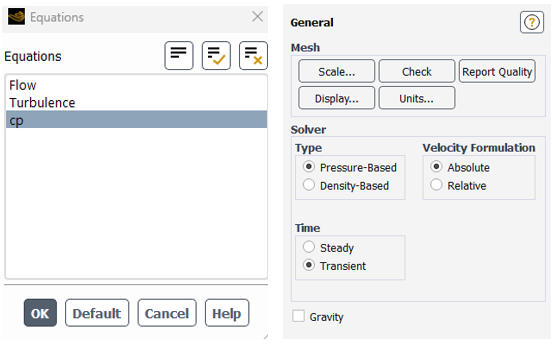
Expressions are added to the named expression list to calculate the uniformity index as well as the fractional volume mixed for both 95% and 99% mixing. The expression names and definitions are displayed below.
uniform
1-Sum( CellVolume*abs( MassFraction(species = 'cp') - VolumeAve(MassFraction(species = 'dn-ase'),["mrf_1","mrf_2","tank","tracer"]) ) /( 2.0* VolumeAve(MassFraction(species = 'dn-ase'),["mrf_1","mrf_2","tank","tracer"])* Volume(["mrf_1","mrf_2","tank","tracer"]) ),["mrf_1","mrf_2","tank","tracer"] )
volavemfdnase
VolumeAve(MassFraction(species = 'cp'),["mrf_1","mrf_2","tank","tracer"])
upperlimit99
1.005*volavemfdnase
upperlimit95
1.025*volavemfdnase
lowerlimit99
0.995*volavemfdnase
lowerlimit95
0.975*volavemfdnase
aboveflag99
IF(MassFraction(species = 'cp') >upperlimit99,1,0)
belowflag99
IF(MassFraction(species = 'cp') <lowerlimit99,1,0)
aboveflag95
IF(MassFraction(species = 'cp') >upperlimit95,1,0)
belowflag95
IF(MassFraction(species = 'cp') <lowerlimit95,1,0)
flags99
aboveflag99+belowflag99
flags95
aboveflag95+belowflag95
myfractionalvolume95
1 - Sum(CellVolume*IF(flags95>0,1.0,0.0),["mrf_1","mrf_2","tank","tracer"])/Volume(["mrf_1","mrf_2","tank","tracer"])
myfractionalvolume99
1 - Sum(CellVolume*IF(flags99>0,1.0,0.0),["mrf_1","mrf_2","tank","tracer"])/Volume(["mrf_1","mrf_2","tank","tracer"])
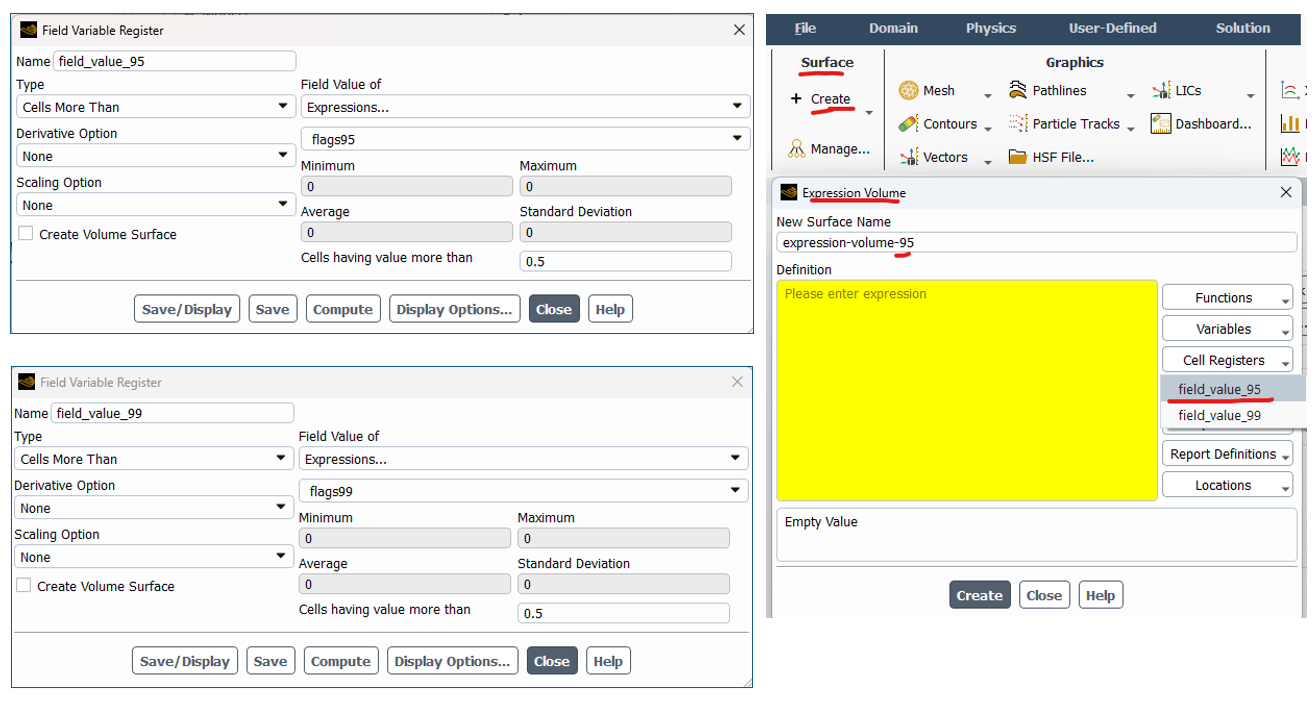
Cell registers based on Field Value are used to capture the mesh element cells that are not mixed for both 95 and 99%. Expression volumes are generated from Surface>Expression Volume to capture the surface representation of the "unmixed" mesh elements.
Reports are defined based on the expressions for uniformity index and fractional volumes. Monitor files and plots are generated from these reports.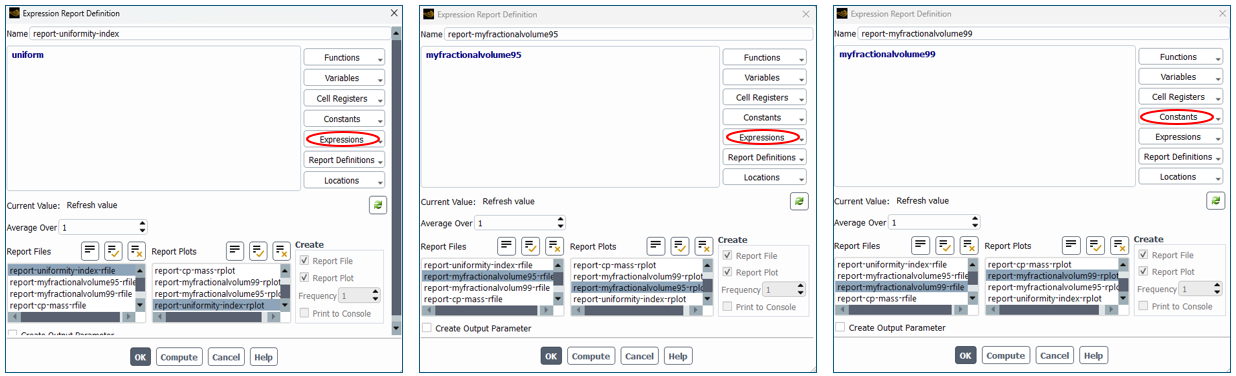
A Scene of the 5% unmixed mesh elements are generated using a scene of 3 mesh objects as shown below. The same can be done for 1% unmixed (not shown). 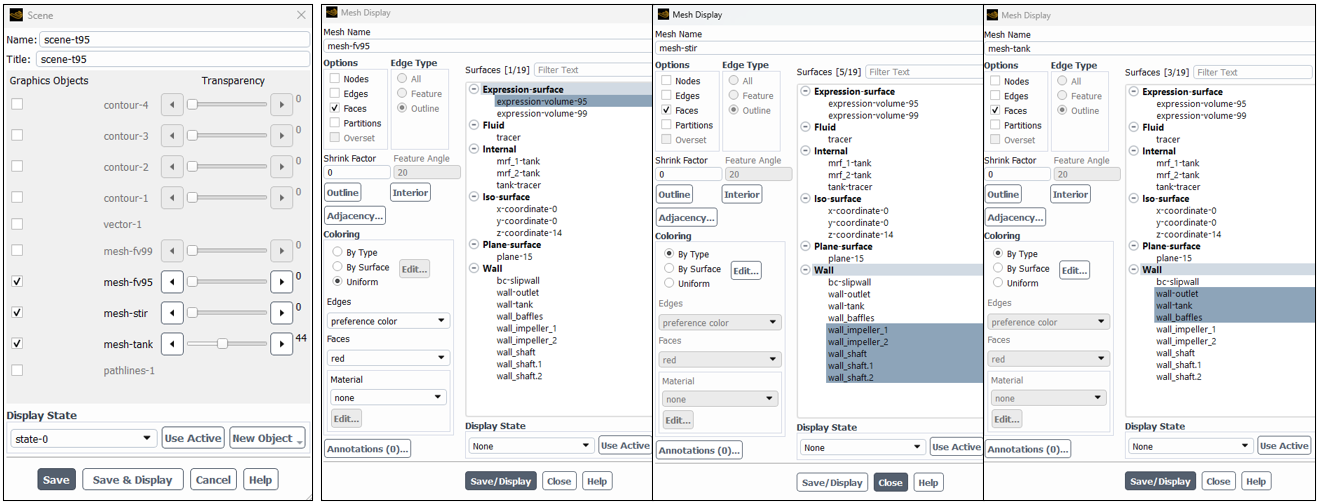
Calculation activities include solution animations of each animation that are used to generate videos of the unmixed mesh elements in the mixer.
Before starting the transient simulation, the mass fraction of the tracer is set to 1.0 in the tracer release zone using the Patch function.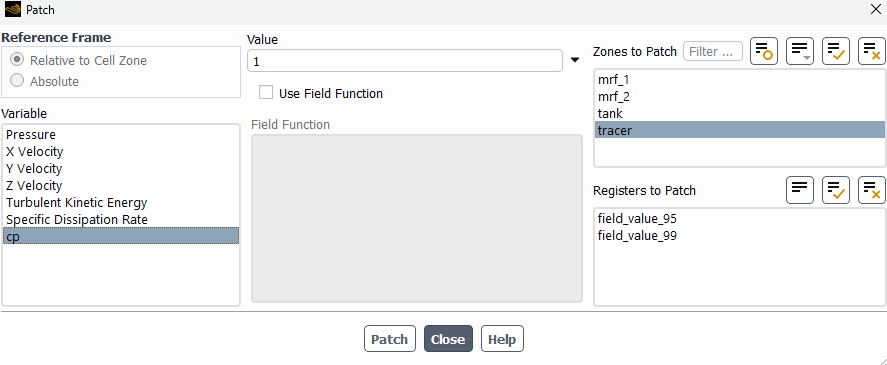
The Bounded Second Order Implicit Transient Formulation is used with a fixed time step size such that the maximum Cell Convective Courant Number is not much more than 1. A smaller time step size is used in the first several time steps to aid convergence at each time step.
Post-Processing
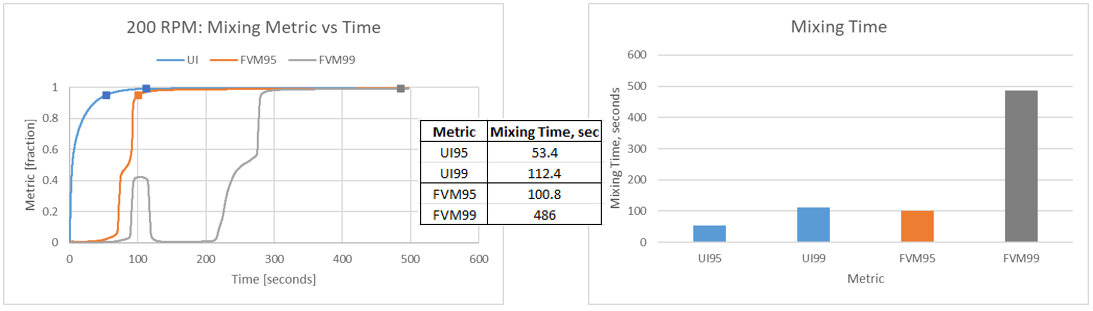
The report files are used to assess the mixing time per the metric of choice: uniformity index, 95% fractional volume mixed, and/or 99% fractional volume mixed. The mixing time for the 95% fractional volume mixed corresponds to the time at which the 95% fractional volume mixed reaches 0.95. The mixing time for the 99% fractional volume mixed corresponds to the time at which the 99% fractional volume mixed reaches 0.99.
Videos are generated from the animation files with tools such as Ansys EnVe. Below are animations from the 95 and 99% fractional volume unmixed cell registers. The animations demonstrate the difference in fractional volume unmixed for the two different criteria.
Considerations
Uniformity index and fractional volume mixed metrics do not evolve at the same rate as they measure different physical phenomena.
Uniformity index describes the statistical uniformity of the entire tank and indicates how well mixed the tank is overall. Uniformity index is based on global variance of concentration, and a little well-mixed zone can reduce the global variance quickly. Uniformity index detects the start of good mixing in any region of the mixing tank, which can result in quick rise over time.
Fractional volume mixed describes the spatial extent of the mixed region and indicates how much of the tank is mixed. Fractional volume mixed requires a local concentration to be within a strict tolerance band, and regions outside the tolerance could reduce the variance slowly. Fractional volume mixed requires most of the tank to reach a tight tolerance, which can result in slow rise over time.
Video of Setup Process
The following video steps through highlights of the setup.
Ansys Solution Benefits
ANSYS offers advanced capabilities for simulating mixing systems which offer numerous benefits, including enhanced design optimization, improved reliability, and cost savings. By accurately mixing system performance, manufacturers can design products that meet specific requirements more efficiently.
Fractional volume mixed calculations can guide engineering evaluation of the time to target mixing as well as indicate the locations of insufficient mixing and/or indicate the influence of geometrical features such as baffles.
Ansys Fluent enables the evaluation of multiple mixing target metrics such as uniformity index and fractional volume mixed. A mixing engineer can evaluate multiple design options with Fluent to understand the mixing process. Beyond Fluent, ANSYS provides tools such as Twin Builder, LS-Dyna, DesignXplorer, OptiSLang, and Mechanical for further design parametrization and evaluation.
Ozen Engineering Expertise

Ozen Engineering Inc. leverages its extensive consulting expertise in CFD, FEA, thermal, optics, photonics, and electromagnetic simulations to achieve exceptional results across various engineering projects, addressing complex challenges like stirred mixing systems using Ansys software.
We offer support, mentoring, and consulting services to enhance the performance and reliability of your systems. Trust our proven track record to accelerate projects, optimize performance, and deliver high-quality, cost-effective results for both new and existing stirred mixing systems. For more information, please visit https://ozeninc.com.
Suggested blogs by Ozen Engineering
- Simulation of Steady Vortex in a Stirred Tank using Ansys Fluent Software Parametric Workflow
- Creating a Reduced Order Model for Vortex Prediction in Stirred Tank
- Getting Started with Ansys FreeFlow: Modeling a Stirred Tank
- Exploring Parametric Studies with PyFluent: Gas–Liquid Stirred Tank Simulation
- Modeling Bubble Dynamics in a Stirred Tank Reactor Using ANSYS Fluent and Population Balance Model
